

Accordion
Accordions group related content into sections users can expand or collapse. They reduce cognitive load, but shouldn’t hide information required for the task at hand.

Table of Contents
Anatomy
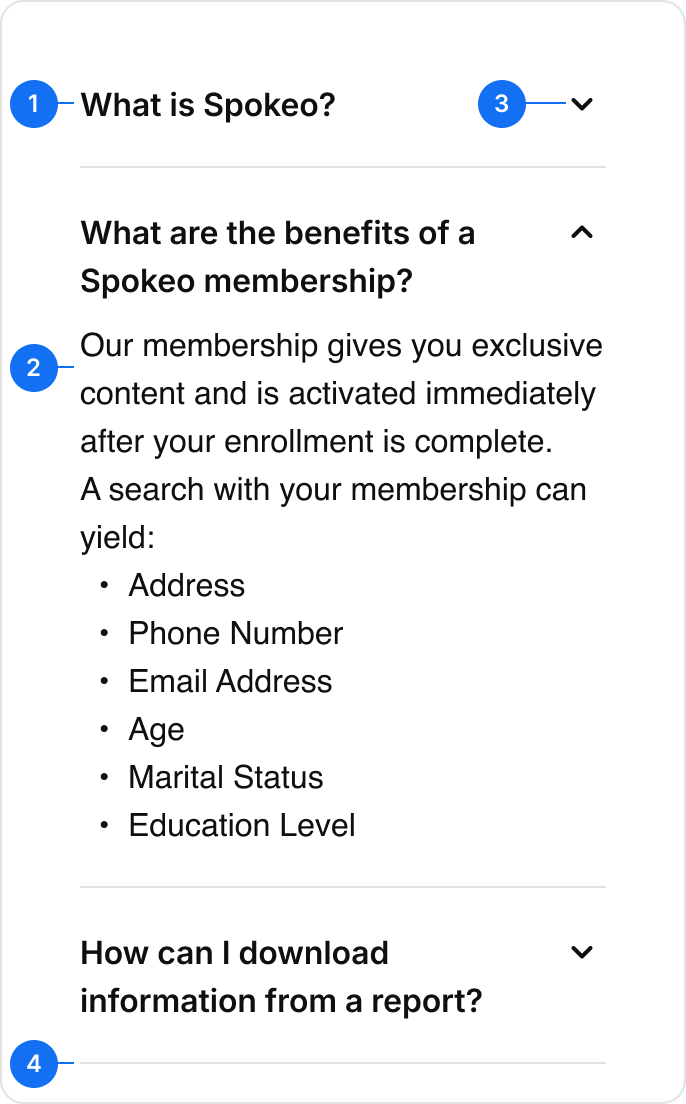
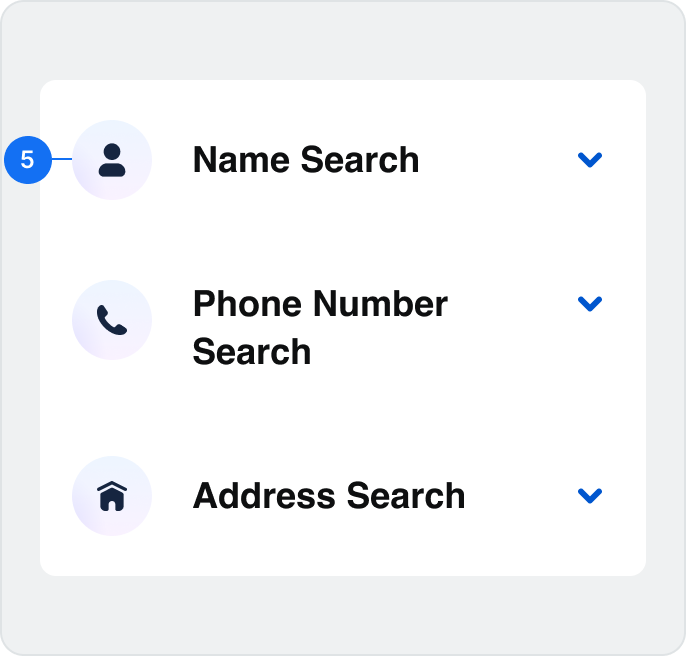
#
Element
1
Title Text *Required
2
Description Text *Required
3
Arrow Icon *Required
4
Divider
5
Nested Icon

Usage
Accordions are containers with information that users can hide and show as needed. They allow users to focus on one section at a time to increase control over their experience. Collapsing information reduces cognitive load and prevents users from feeling overwhelmed.
Use for:
- Condensing page height by grouping related information together
- Reducing scrolling for non-essential content, especially in mobile
FAQ
Learn more about our intuitive products and your Spokeo subscriptionLearn more about our intuitive products and your Spokeo subscriptionLearn more about our intuitive products and your Spokeo subscriptionLearn more about our intuitive products and your Spokeo subscription

What is Spokeo?

Spokeo is the most comprehensive People Search Engine in the US. Our unique technology and proprietary algorithms combine offline directory and demographic data with the most complete online social data set in the world.

What are the benefits of a Spokeo membership?

How can I download information from a report?
Don’t use for:
- Essential information that needs to be opened, forcing users to open each item individually creates a cumbersome experience
Billing Information
Credit Card Information
Contact Information
Order Summary


Don’t: Hide information that is essential to the user experience
Closed by default
By default, accordions should keep content hidden until a user opens them. If necessary, the first item in the accordion list can be open by default.
FAQ
Learn more about our intuitive products and your Spokeo subscriptionLearn more about our intuitive products and your Spokeo subscriptionLearn more about our intuitive products and your Spokeo subscriptionLearn more about our intuitive products and your Spokeo subscription
What is Spokeo?
What are the benefits of a Spokeo membership?
How can I download information from a report?
What do I do if I have too many search results?
Multiple open items
Accordions should close automatically if a new item is opened. However, exceptions can be made in situations where content is not hierarchical or needs to be viewed simultaneously.
FAQ
Learn more about our intuitive products and your Spokeo subscriptionLearn more about our intuitive products and your Spokeo subscriptionLearn more about our intuitive products and your Spokeo subscriptionLearn more about our intuitive products and your Spokeo subscription
What is Spokeo?
Spokeo is the most comprehensive People Search Engine in the US. Our unique technology and proprietary algorithms combine offline directory and demographic data with the most complete online social data set in the world.
What are the benefits of a Spokeo membership?
Our membership gives you exclusive content and is activated immediately after your enrollment is complete.
A search with your membership can yield:
- Address
- Phone Number
- Email Address
- Age
- Marital Status
- Education Level
How can I download information from a report?
Depending on your membership, you may be able to download free PDFs of the reports you're viewing. Click the "PDF" icon on the report page to download and print your report.
If your membership type does not support free PDF downloads, you will be asked to upgrade your membership when you click on the "PDF" icon. In addition to free PDF downloads, your upgraded membership will include access to Court, Marriage, Death, and Historical records for free.
Custom colors
Accordions can have customized background colors applied based on the page they’re displayed in.

What are the benefits of a Spokeo membership?


Is my search private and confidential?
How does Spokeo help me find who I’m looking for?
What social media and dating platforms does Spokeo collect information from?
Frequently Asked Questions

What are the benefits of a Spokeo membership?


Is my search private and confidential?
How does Spokeo help me find who I’m looking for?
What social media and dating platforms does Spokeo collect information from?
Where does Spokeo get its information?

People in the United States
Spokeo’s online white pages include public information on over 250 million US adults.


See more names



Landing Page FAQs
Example
Reverse Address Lookup

Find out who lives there

Reverse address lookup not only allows you to discover the current property owners and residents of an address, but also provides access to valuable information about their background.
Research potential homes


Connect with residents/owners
Landing Page Features
Example
Dividers
Dividers can be used to create separation between larger list items.
How Does a Reverse Address Search Work?
How to Use Reverse Address Lookup
How a Reverse Address Search Can Help You
What if I can't find what I am looking for?
Accordion with dividers
Example
How Does a Reverse Address Search Work?
How to Use Reverse Address Lookup
How a Reverse Address Search Can Help You
What if I can't find what I am looking for?
Accordion without dividers
Example
Content width
Accordions can be displayed using full width or inset styling.
How do I perform a reverse phone lookup?
How does a reverse phone lookup work?
How can I do a reverse phone lookup for free?
How to track a phone number?
Full width accordion
Example

How do I perform a reverse phone lookup?
How does a reverse phone lookup work?
How can I do a reverse phone lookup for free?
How to track a phone number?
Inset accordion
Example
Line length
Content should be kept to a maximum of 800px wide in order to create a more comfortable reading experience.
800px max width
FAQ
Accordions are containers with information that users can hide and show as needed. They allow users to focus on one section at a time, allowing for increased control over their experience. Collapsing information allows for a decrease in cognitive load in an effort to avoid overwhelming users.
What is Spokeo?
What are the benefits of a Spokeo membership?
How can I download information from a report?
What do I do if I have too many search results?
States
The Accordion States section explains the different interaction states an accordion component can be in—such as collapsed (closed), expanded (open), hover, focus, and disabled—so that designers and developers apply consistent visual and behavioral patterns. Defining these states helps ensure that the accordion behaves predictably and is easy for users to interact with across all parts of the product.
Full width accordions
States for full width accordions:
Default - Collapsed
What is Spokeo?

Default - Expanded
What is Spokeo?
Spokeo is the most comprehensive People Search Engine in the US. Our unique technology and proprietary algorithms combine offline directory and demographic data with the most complete online social data set in the world.
Hover - Collapsed
What is Spokeo?
Hover - Expanded
What is Spokeo?
Spokeo is the most comprehensive People Search Engine in the US. Our unique technology and proprietary algorithms combine offline directory and demographic data with the most complete online social data set in the world.
Focus-visible - Collapsed
What is Spokeo?
Focus-visible - Expanded
What is Spokeo?
Spokeo is the most comprehensive People Search Engine in the US. Our unique technology and proprietary algorithms combine offline directory and demographic data with the most complete online social data set in the world.
Inset accordions with Icon
States for full width accordions:
Default - Collapsed
What is Spokeo?
Default - Expanded
What is Spokeo?
Spokeo is the most comprehensive People Search Engine in the US. Our unique technology and proprietary algorithms combine offline directory and demographic data with the most complete online social data set in the world.
Hover - Collapsed
What is Spokeo?
Hover - Expanded
What is Spokeo?
Spokeo is the most comprehensive People Search Engine in the US. Our unique technology and proprietary algorithms combine offline directory and demographic data with the most complete online social data set in the world.
Focus-visible - Collapsed
What is Spokeo?
Focus-visible - Expanded
What is Spokeo?
Spokeo is the most comprehensive People Search Engine in the US. Our unique technology and proprietary algorithms combine offline directory and demographic data with the most complete online social data set in the world.
Specifications
This section defines the visual and interaction specifications for the accordion component across use cases — including default collapsed and expanded views, versions with icons, and responsive or full‑width layouts. It outlines consistent spacing, alignment, typography, and content behavior so designers and developers can implement accordions that feel predictable, accessible, and aligned with our overall UI language.
Full width accordions
Specs for full width accordions:
Default - Collapsed
What is Spokeo?
8
20
20
Default - Expanded
What is Spokeo?
Spokeo is the most comprehensive People Search Engine in the US. Our unique technology and proprietary algorithms combine offline directory and demographic data with the most complete online social data set in the world.
8
20
8
20
Inset accordions with Icon
States for full width accordions:
Default - Collapsed
What is Spokeo?
8
16
16
12
20
20
Default - Expanded
What is Spokeo?
Spokeo is the most comprehensive People Search Engine in the US. Our unique technology and proprietary algorithms combine offline directory and demographic data with the most complete online social data set in the world.
8
16
16
20
20
8
12
Best Practices

What is Spokeo?

What is Spokeo?
What is Spokeo?
What is Spokeo?
What is Spokeo?


Do: Use trailing icons for collapse/expand arrows

What is Spokeo?
What is Spokeo?
What is Spokeo?
What is Spokeo?
What is Spokeo?

Don’t: Use leading icons for collapse/expand arrows
How Does a Reverse Address Search Work?
How to Use Reverse Address Lookup
How a Reverse Address Search Can Help You
What if I can't find what I am looking for?
Do: Use leading icons for artwork inside of accordions
How Does a Reverse Address Search Work?
How to Use Reverse Address Lookup

How a Reverse Address Search Can Help You
What if I can't find what I am looking for?
Don’t: Mix and match or use trailing icons at the end of accordion items
How do I perform a reverse phone lookup?
How does a reverse phone lookup work?
How can I do a reverse phone lookup for free?
How to track a phone number?
Do: Use secondary nested icons for collapsed accordion items
How do I perform a reverse phone lookup?
How does a reverse phone lookup work?
How can I do a reverse phone lookup for free?
How to track a phone number?
Don’t: Use primary nested icons for collapsed accordion items


Contact Us
Terms
Privacy Policy
Copyright © 2006-2025 Spokeo, Inc.


Accordion
Accordions group related content into sections users can expand or collapse. They reduce cognitive load, but shouldn’t hide information required for the task at hand.


Table of Contents
Anatomy
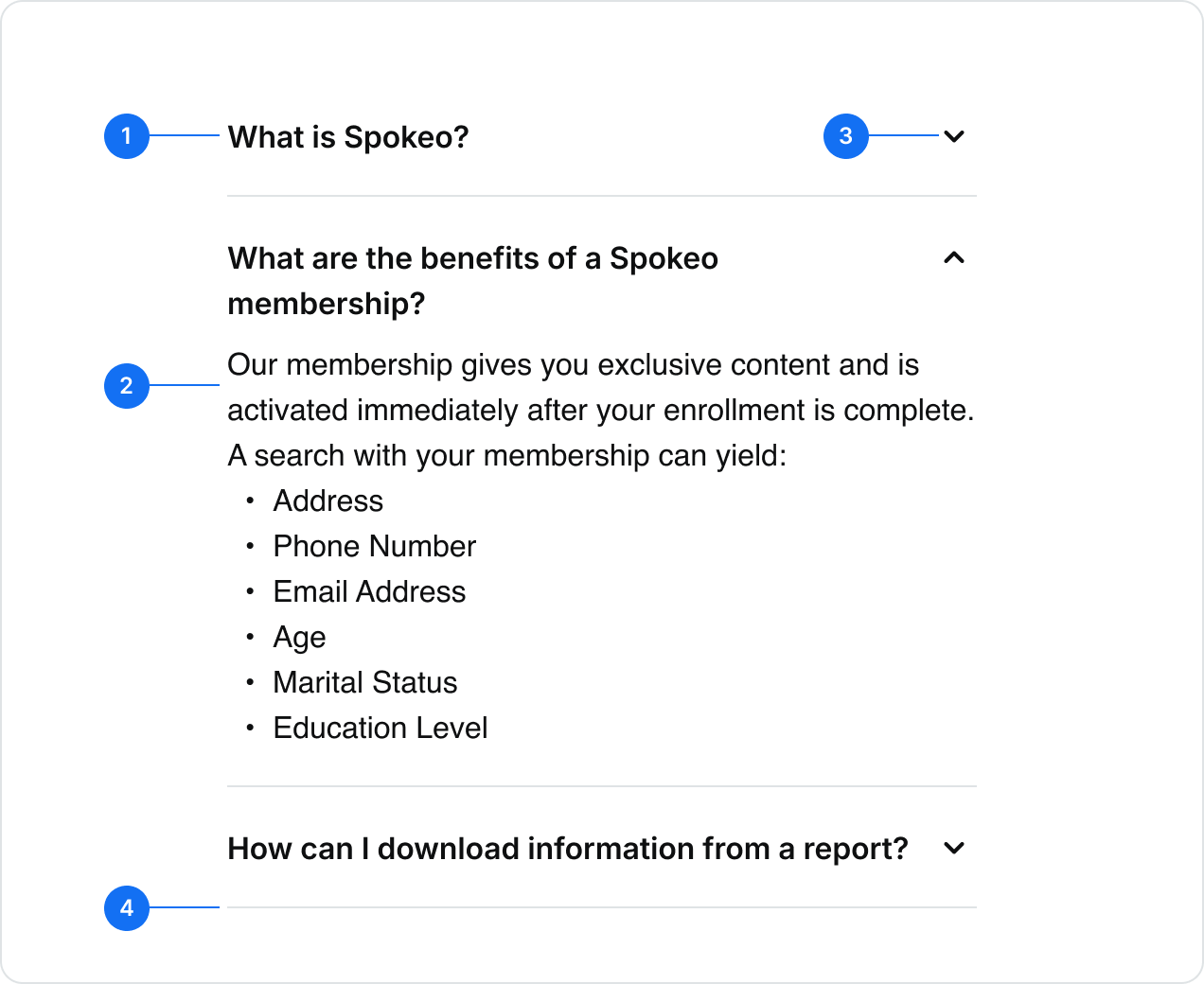
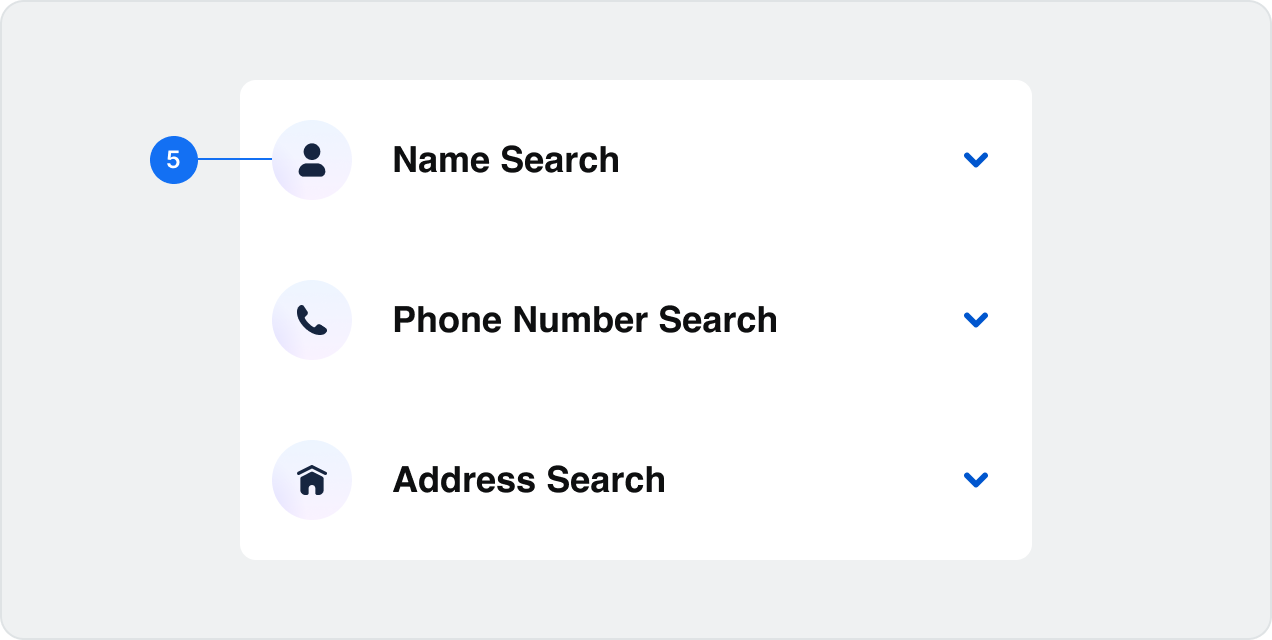
#
Element
1
Title Text *Required
2
Description Text *Required
3
Arrow Icon *Required
4
Divider
5
Nested Icon

Usage
Accordions are containers with information that users can hide and show as needed. They allow users to focus on one section at a time to increase control over their experience. Collapsing information reduces cognitive load and prevents users from feeling overwhelmed.
Use for:
- Condensing page height by grouping related information together
- Reducing scrolling for non-essential content, especially in mobile
FAQ
Learn more about our intuitive products and your Spokeo subscriptionLearn more about our intuitive products and your Spokeo subscriptionLearn more about our intuitive products and your Spokeo subscriptionLearn more about our intuitive products and your Spokeo subscription

What is Spokeo?
Spokeo is the most comprehensive People Search Engine in the US. Our unique technology and proprietary algorithms combine offline directory and demographic data with the most complete online social data set in the world.

What are the benefits of a Spokeo membership?
How can I download information from a report?
Don’t use for:
- Essential information that needs to be opened, forcing users to open each item individually creates a cumbersome experience
Billing Information
Credit Card Information
Contact Information
Order Summary

Don’t: Hide information that is essential to the user experience
Closed by default
By default, accordions should keep content hidden until a user opens them. If necessary, the first item in the accordion list can be open by default.
FAQ
Learn more about our intuitive products and your Spokeo subscriptionLearn more about our intuitive products and your Spokeo subscriptionLearn more about our intuitive products and your Spokeo subscriptionLearn more about our intuitive products and your Spokeo subscription
What is Spokeo?
What are the benefits of a Spokeo membership?
How can I download information from a report?
What do I do if I have too many search results?
Multiple open items
Accordions should close automatically if a new item is opened. However, exceptions can be made in situations where content is not hierarchical or needs to be viewed simultaneously.
FAQ
Learn more about our intuitive products and your Spokeo subscriptionLearn more about our intuitive products and your Spokeo subscriptionLearn more about our intuitive products and your Spokeo subscriptionLearn more about our intuitive products and your Spokeo subscription
What is Spokeo?
Spokeo is the most comprehensive People Search Engine in the US. Our unique technology and proprietary algorithms combine offline directory and demographic data with the most complete online social data set in the world.
What are the benefits of a Spokeo membership?
Our membership gives you exclusive content and is activated immediately after your enrollment is complete.
A search with your membership can yield:
- Address
- Phone Number
- Email Address
- Age
- Marital Status
- Education Level
How can I download information from a report?
Depending on your membership, you may be able to download free PDFs of the reports you're viewing. Click the "PDF" icon on the report page to download and print your report.
If your membership type does not support free PDF downloads, you will be asked to upgrade your membership when you click on the "PDF" icon. In addition to free PDF downloads, your upgraded membership will include access to Court, Marriage, Death, and Historical records for free.
Custom colors
Accordions can have customized background colors applied based on the page they’re displayed in.

What are the benefits of a Spokeo membership?

Is my search private and confidential?
How does Spokeo help me find who I’m looking for?
What social media and dating platforms does Spokeo collect information from?
Frequently Asked Questions
What are the benefits of a Spokeo membership?
Is my search private and confidential?
How does Spokeo help me find who I’m looking for?
What social media and dating platforms does Spokeo collect information from?
Where does Spokeo get its information?
People in the United States
Spokeo’s online white pages include public information on over 250 million US adults.
See more names
Landing Page FAQs
Example
How to Use Reverse Address Lookup
Find out who lives there
Reverse address lookup not only allows you to discover the current property owners and residents of an address, but also provides access to valuable information about their background, such as their employment history, criminal records*, and social media profiles, giving you a comprehensive understanding of who they are. *Additional fees apply
Research potential homes
Connect with residents/owners
Landing Page Features
Example
Dividers
Dividers can be used to create separation between larger list items.

How Does a Reverse Address Search Work?

How to Use Reverse Address Lookup
How a Reverse Address Search Can Help You
What if I can't find what I am looking for?
Accordion with dividers
Example
How Does a Reverse Address Search Work?
How to Use Reverse Address Lookup
How a Reverse Address Search Can Help You
What if I can't find what I am looking for?
Accordion without dividers
Example
Content width
Accordions can be displayed using full width or inset styling.
How do I perform a reverse phone lookup?
How does a reverse phone lookup work?
How can I do a reverse phone lookup for free?
How to track a phone number?
Full width accordion
Example
How do I perform a reverse phone lookup?
How does a reverse phone lookup work?
How can I do a reverse phone lookup for free?
How to track a phone number?
Inset accordion
Example
Line length
Content should be kept to a maximum of 800px wide in order to create a more comfortable reading experience.
800px max width
FAQ
Accordions are containers with information that users can hide and show as needed. They allow users to focus on one section at a time, allowing for increased control over their experience. Collapsing information allows for a decrease in cognitive load in an effort to avoid overwhelming users.

What is Spokeo?

What are the benefits of a Spokeo membership?
How can I download information from a report?
What do I do if I have too many search results?
States
The Accordion States section explains the different interaction states an accordion component can be in—such as collapsed (closed), expanded (open), hover, focus, and disabled—so that designers and developers apply consistent visual and behavioral patterns. Defining these states helps ensure that the accordion behaves predictably and is easy for users to interact with across all parts of the product.
Full width accordions
States for full width accordions:
Default - Collapsed
What is Spokeo?

Default - Expanded
What is Spokeo?
Spokeo is the most comprehensive People Search Engine in the US. Our unique technology and proprietary algorithms combine offline directory and demographic data with the most complete online social data set in the world.
Hover - Collapsed
What is Spokeo?
Hover - Expanded
What is Spokeo?
Spokeo is the most comprehensive People Search Engine in the US. Our unique technology and proprietary algorithms combine offline directory and demographic data with the most complete online social data set in the world.
Focus-visible - Collapsed
What is Spokeo?
Focus-visible - Expanded
What is Spokeo?
Spokeo is the most comprehensive People Search Engine in the US. Our unique technology and proprietary algorithms combine offline directory and demographic data with the most complete online social data set in the world.
Inset accordions with Icon
States for full width accordions:
Default - Collapsed
What is Spokeo?
Default - Expanded
What is Spokeo?
Spokeo is the most comprehensive People Search Engine in the US. Our unique technology and proprietary algorithms combine offline directory and demographic data with the most complete online social data set in the world.
Hover - Collapsed
What is Spokeo?
Hover - Expanded
What is Spokeo?
Spokeo is the most comprehensive People Search Engine in the US. Our unique technology and proprietary algorithms combine offline directory and demographic data with the most complete online social data set in the world.
Focus-visible - Collapsed
What is Spokeo?
Focus-visible - Expanded
What is Spokeo?
Spokeo is the most comprehensive People Search Engine in the US. Our unique technology and proprietary algorithms combine offline directory and demographic data with the most complete online social data set in the world.
Specifications
This section defines the visual and interaction specifications for the accordion component across use cases — including default collapsed and expanded views, versions with icons, and responsive or full‑width layouts. It outlines consistent spacing, alignment, typography, and content behavior so designers and developers can implement accordions that feel predictable, accessible, and aligned with our overall UI language.
Full width accordions
Specs for full width accordions:
Default - Collapsed
What is Spokeo?

8
20
20
Default - Expanded
What is Spokeo?
Spokeo is the most comprehensive People Search Engine in the US. Our unique technology and proprietary algorithms combine offline directory and demographic data with the most complete online social data set in the world.
8
20
8
20
Inset accordions with Icon
States for full width accordions:
Default - Collapsed
What is Spokeo?
8
16
16
12
20
20
Default - Expanded
What is Spokeo?
Spokeo is the most comprehensive People Search Engine in the US. Our unique technology and proprietary algorithms combine offline directory and demographic data with the most complete online social data set in the world.
8
16
16
20
20
8
12
Best Practices
What is Spokeo?
What is Spokeo?
What is Spokeo?
What is Spokeo?
What is Spokeo?

Do: Use trailing icons for collapse/expand arrows
What is Spokeo?
What is Spokeo?
What is Spokeo?
What is Spokeo?
What is Spokeo?
Don’t: Use leading icons for collapse/expand arrows
How Does a Reverse Address Search Work?
How to Use Reverse Address Lookup
How a Reverse Address Search Can Help You
What if I can't find what I am looking for?
Do: Use leading icons for artwork inside of accordions
How Does a Reverse Address Search Work?
How to Use Reverse Address Lookup
How a Reverse Address Search Can Help You
What if I can't find what I am looking for?
Don’t: Mix and match or use trailing icons at the end of accordion items
How do I perform a reverse phone lookup?
How does a reverse phone lookup work?
How can I do a reverse phone lookup for free?
How to track a phone number?
Do: Use secondary nested icons for collapsed accordion items
How do I perform a reverse phone lookup?
How does a reverse phone lookup work?
How can I do a reverse phone lookup for free?
How to track a phone number?
Don’t: Use primary nested icons for collapsed accordion items

Contact Us
Terms
Privacy Policy
Copyright © 2006-2025 Spokeo, Inc.